---
title: Signing up to the platform and account management
description: Signing up to the platform and account management
---
[Skip to content](https://help.fairpicture.org/support/solutions/articles/101000498483#main-content)
English
Show submenu for translations

Open main navigation
Close main navigation
- English
Show submenu for translations
- Contact us
Contact us
How can we help you?
- There are no suggestions because the search field is empty.
1. [Fairpicture Help Center](https://help.fairpicture.org/support?hsLang=en)
2. [Content Production (Creators)](https://help.fairpicture.org/support/content-production-creators?hsLang=en)
3. [Getting started on the platform for visual creators](https://help.fairpicture.org/support/content-production-creators?hsLang=en#getting-started-on-the-platform-for-visual-creators)
# Signing up to the platform and account management
**TABLE OF CONTENTS**
- [How can I sign up to the Fairpicture platform?](https://help.fairpicture.org/support/solutions/articles/101000498483#How-can-I-sign-up-to-the-Fairpicture-platform?)
- [How can I add or edit information in my profile?](https://help.fairpicture.org/support/solutions/articles/101000498483#How-can-I-add-or-edit-information-in-my-profile?)
# How can I sign up to the Fairpicture platform?
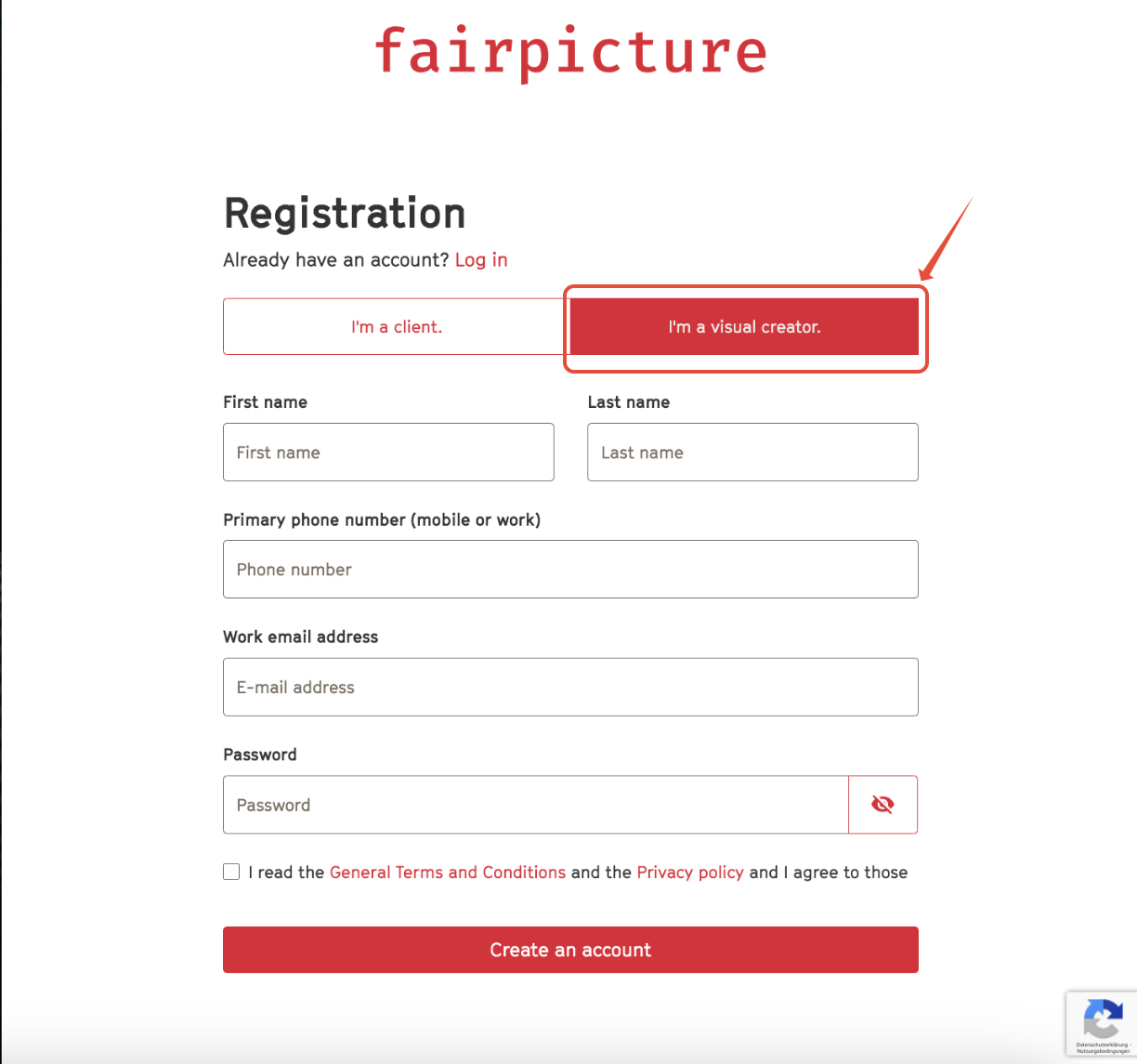
1. Go to [https://app.fairpicture.org/signup/](https://app.fairpicture.org/signup/)
2. Choose Visual Creator (see image below).
3. Fill in all required fields and click Create an account.
4. You receive an email with a verification link to your email address. Click on the link provided in the email we sent you and confirm your email on the window that opens.
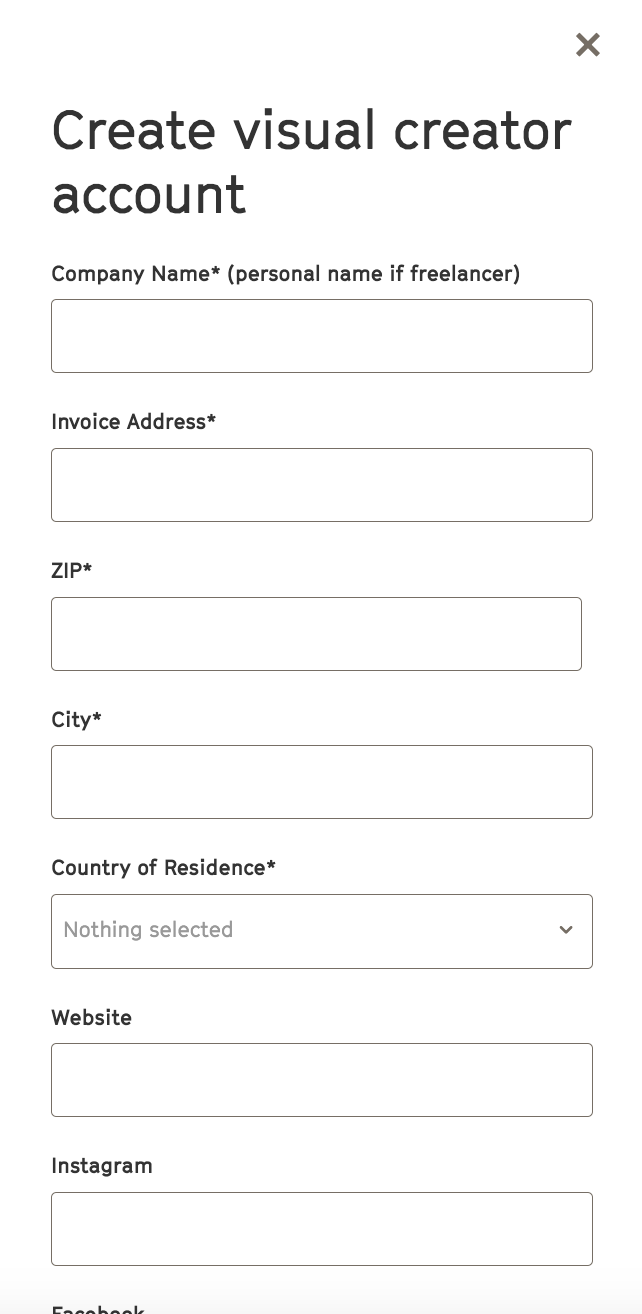
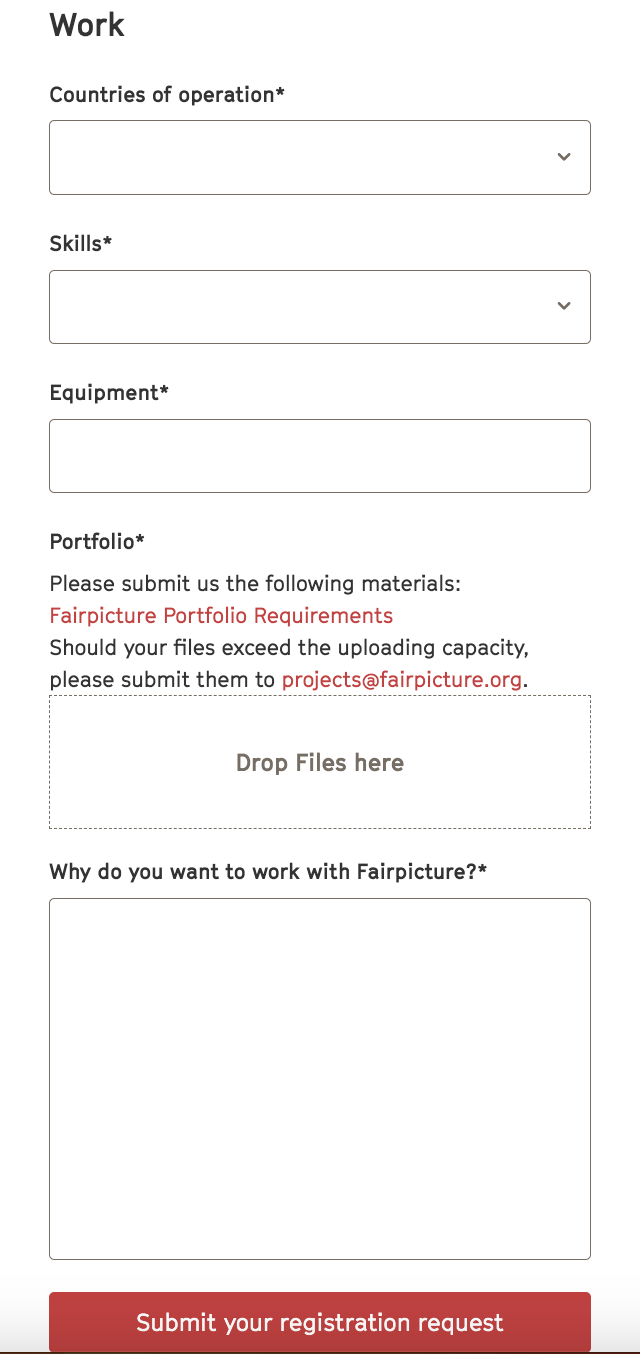
5. After your confirmation, please complete your profile by clicking Create visual creator account and filling in the required information (see images below).
6. Submit your registration by clicking submit registration request.
- Please note that **your request ist not submitted without completion of this step**.
7. Fairpicture will accept your registration or get in touch with you.
---
# How can I add or edit information in my profile?
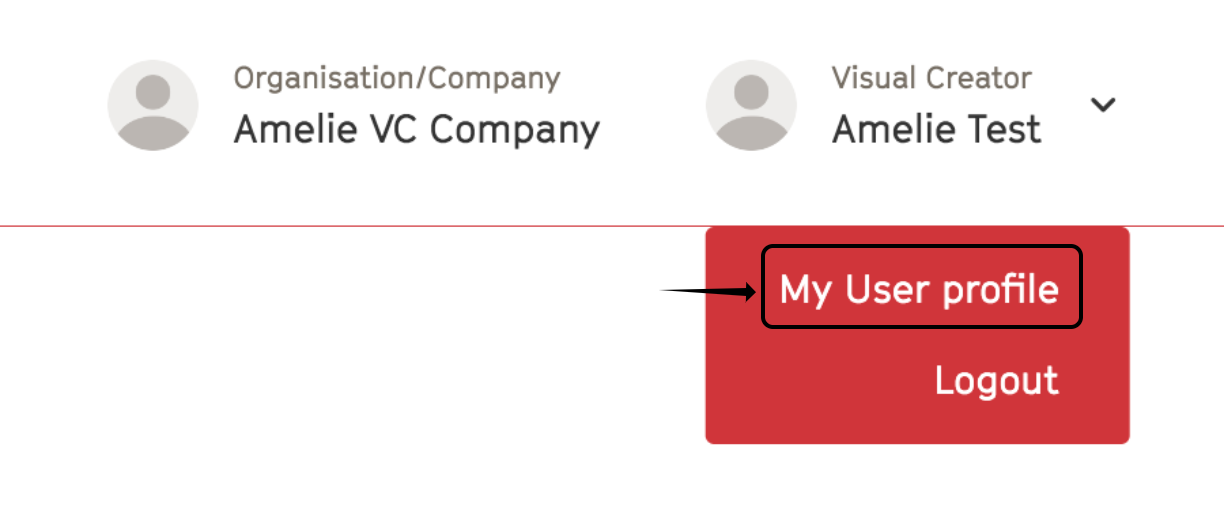
1. Click on your avatar at the top right of the page and then on My User profile (see image below).
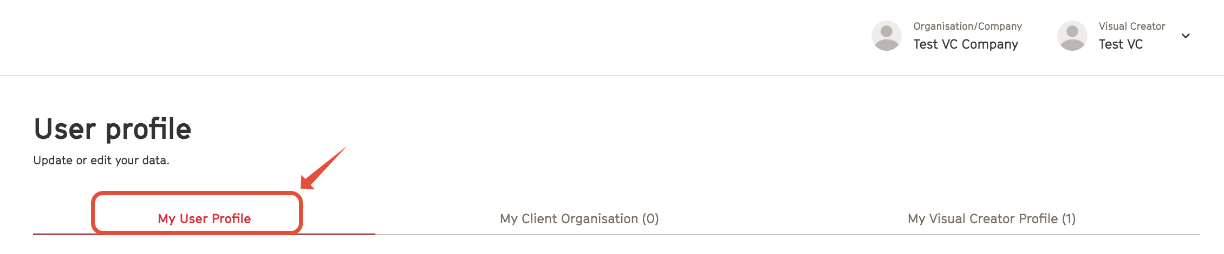
2. Click on My User Profile to edit your basic data such as name, pronouns, email or profile picture (see image below).
3. Click Save at the bottom of the page to save changes.
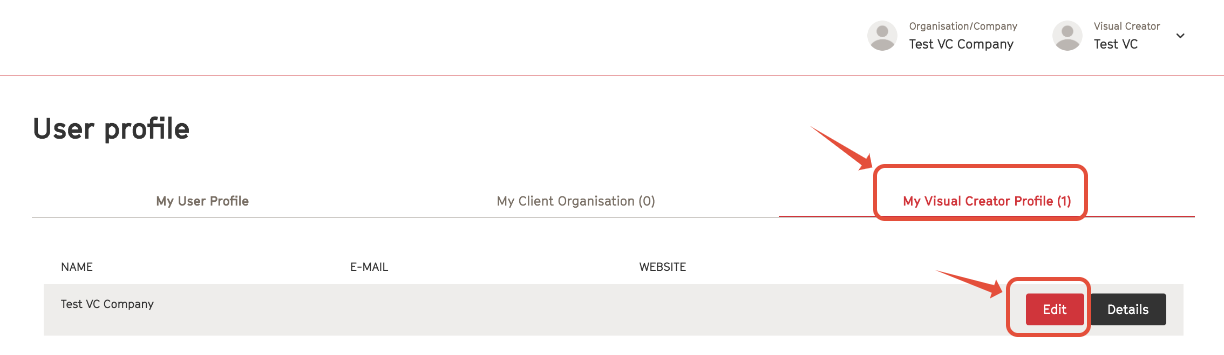
4. Click My Visual Creator Profile and then Edit in order to edit information such as your address, work countries, socials, equipment (see image below).
5. Don't forget to save the changes before leaving the page.
- [FAQ for Clients](https://help.fairpicture.org/support/faq-for-clients?hsLang=en#main-content)
- [Services](https://help.fairpicture.org/support/faq-for-clients?hsLang=en#services)
- [Prices](https://help.fairpicture.org/support/faq-for-clients?hsLang=en#prices)
- [Starting a project](https://help.fairpicture.org/support/faq-for-clients?hsLang=en#starting-a-project)
- [FAQ in Projects](https://help.fairpicture.org/support/faq-for-clients?hsLang=en#faq-in-projects)
- [Platform Tutorials](https://help.fairpicture.org/support/platform-tutorials?hsLang=en#main-content)
- [Post-production tutorials](https://help.fairpicture.org/support/platform-tutorials?hsLang=en#post-production-tutorials)
- [Platform tutorials](https://help.fairpicture.org/support/platform-tutorials?hsLang=en#platform-tutorials)
- [FAQ for Visual Creators](https://help.fairpicture.org/support/faq-for-visual-creators?hsLang=en#main-content)
- [Rates and Payment](https://help.fairpicture.org/support/faq-for-visual-creators?hsLang=en#rates-and-payment)
- [Getting started on the platform](https://help.fairpicture.org/support/faq-for-visual-creators?hsLang=en#getting-started-on-the-platform)
- [Services](https://help.fairpicture.org/support/faq-for-visual-creators?hsLang=en#services)
- [VC questions](https://help.fairpicture.org/support/faq-for-visual-creators?hsLang=en#vc-questions)
- [FairConsent App and Platform](https://help.fairpicture.org/support/fairconsent-app-and-platform?hsLang=en#main-content)
- [Subscription & Billing](https://help.fairpicture.org/support/fairconsent-app-and-platform?hsLang=en#subscription-billing)
- [FairConsent Platform](https://help.fairpicture.org/support/fairconsent-app-and-platform?hsLang=en#fairconsent-platform)
- [05 Roles Access and Data Boundaries](https://help.fairpicture.org/support/fairconsent-app-and-platform?hsLang=en#05-roles-access-and-data-boundaries)
- [Updates & Support](https://help.fairpicture.org/support/fairconsent-app-and-platform?hsLang=en#updates-support)
- [06 Risk, Limitations and Warnings](https://help.fairpicture.org/support/fairconsent-app-and-platform?hsLang=en#06-risk-limitations-and-warnings)
- [08 DAM Integrations](https://help.fairpicture.org/support/fairconsent-app-and-platform?hsLang=en#08-dam-integrations)
- [Frequently Asked Questions (FAQ)](https://help.fairpicture.org/support/fairconsent-app-and-platform?hsLang=en#frequently-asked-questions-faq)
- [02 Getting Started](https://help.fairpicture.org/support/fairconsent-app-and-platform?hsLang=en#02-getting-started)
- [04 FairConsent Platform](https://help.fairpicture.org/support/fairconsent-app-and-platform?hsLang=en#04-fairconsent-platform)
- [FairConsent App](https://help.fairpicture.org/support/fairconsent-app-and-platform?hsLang=en#fairconsent-app)
- [01 User Experience Overview](https://help.fairpicture.org/support/fairconsent-app-and-platform?hsLang=en#01-user-experience-overview)
- [07 Consent Links Beta](https://help.fairpicture.org/support/fairconsent-app-and-platform?hsLang=en#07-consent-links-beta)
- [03 FairConsent App](https://help.fairpicture.org/support/fairconsent-app-and-platform?hsLang=en#03-fairconsent-app)
- [Content Production (Creators)](https://help.fairpicture.org/support/content-production-creators?hsLang=en#main-content)
- [Review and payment](https://help.fairpicture.org/support/content-production-creators?hsLang=en#review-and-payment)
- [What we offer and how we work for creators](https://help.fairpicture.org/support/content-production-creators?hsLang=en#what-we-offer-and-how-we-work-for-creators)
- [Getting started on the platform for visual creators](https://help.fairpicture.org/support/content-production-creators?hsLang=en#getting-started-on-the-platform-for-visual-creators)
- [Project organisation](https://help.fairpicture.org/support/content-production-creators?hsLang=en#project-organisation)
- [FairConsent for Fairpicture Projects](https://help.fairpicture.org/support/content-production-creators?hsLang=en#fairconsent-for-fairpicture-projects)
- [Production and post-production](https://help.fairpicture.org/support/content-production-creators?hsLang=en#production-and-post-production)
- [Project brief & deliverables](https://help.fairpicture.org/support/content-production-creators?hsLang=en#project-brief-deliverables)
- [Content Production (Clients)](https://help.fairpicture.org/support/content-production-clients?hsLang=en#main-content)
- [Getting started on the platform for clients](https://help.fairpicture.org/support/content-production-clients?hsLang=en#getting-started-on-the-platform-for-clients)
- [Starting a project](https://help.fairpicture.org/support/content-production-clients?hsLang=en#starting-a-project)
- [Project organisation](https://help.fairpicture.org/support/content-production-clients?hsLang=en#project-organisation)
- [What we offer and how we work](https://help.fairpicture.org/support/content-production-clients?hsLang=en#what-we-offer-and-how-we-work)
- [Project brief](https://help.fairpicture.org/support/content-production-clients?hsLang=en#project-brief)
- [Consent](https://help.fairpicture.org/support/content-production-clients?hsLang=en#consent)
- [Image material](https://help.fairpicture.org/support/content-production-clients?hsLang=en#image-material)
- [Support for Project Managers](https://help.fairpicture.org/support/support-for-project-managers?hsLang=en#main-content)
- [Request and offer](https://help.fairpicture.org/support/support-for-project-managers?hsLang=en#request-and-offer)
- [Consent](https://help.fairpicture.org/support/support-for-project-managers?hsLang=en#consent)
- [Invoice and Payment](https://help.fairpicture.org/support/support-for-project-managers?hsLang=en#invoice-and-payment)
- [Image material](https://help.fairpicture.org/support/support-for-project-managers?hsLang=en#image-material)
- [Production](https://help.fairpicture.org/support/support-for-project-managers?hsLang=en#production)
[](https://fairpicture.org/static/img/fairpicture.svg)
[mailto:email@email.com](mailto:email@email.com)
Copyright © 2026, Fairpicture AG