
This article is intended for: Owner, Admins, Managers, Collectors.
Applies To: FairConsent Mobile App & FairConsent Platform
Purpose of this article
This article explains the three user roles available in FairConsent and what each role can and cannot do.
It exists to clarify:
- Platform access vs mobile app access
- Operational responsibilities
- Seat usage and subscription implications
Roles in FairConsent are explicit by design and do not overlap.
1. Users and License
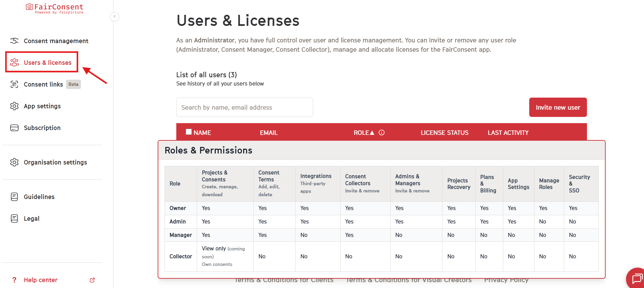
- Click on "Users and Licenses" in the left-hand menu, then navigate to Roles to view their responsibilities.
2. Core Principles
User access in FairConsent follows these rules:
- Roles define capabilities, not exceptions
- Platform access does not automatically grant app access
- Using the mobile app requires an assigned seat
- No role can bypass uploading, project completion, or data deletion rules
3. The Three Roles in FairConsent
a. Consent Collector:
- Primary Context: Mobile App
- Platform Access: No operational platform access
What Consent Collectors Can Do:
Collectors use the FairConsent app to:
- Record consent in the field
- Capture signatures, photos, or audio confirmation
- Upload recorded consents
- Create a project if its enabled by admin from the platform
What They Cannot Do:
- View consent records in the platform
- Manage users
- Manage subscriptions
- Edit consent terms
- Access organization settings
Seat Requirement
A seat is required for a Consent Collector to use the mobile app.
b. Consent Manager
- Primary Context: Web Platform
- Platform Access: Operational access
What Consent Managers Can Do:
- View and manage uploaded consents
- Review project activity
- Manage collectors
- Configure consent terms
What They Cannot Do:
- Manage billing
- Change subscriptions
- Manage Admins & Managers
- Integrations
- Project recovery permission
- App settings
- Security and SSO
Managers may use the app only if they assign themselves a seat.
c. Organization Admin
- Primary Context: Web Platform
- Platform Access: Full access
What Organization Admins Can Do:
Admins can do everything Managers can, plus:
- Manage subscriptions
- Access billing settings
- Change plans
- Assign, and reassign seat
- App settings
- Projects recovery
What They Cannot Do:
- Manage roles
- Security and SSO
Admins may also use the mobile app if they assign themselves a seat.
d. Owners
-
Primary Context: Web Platform
-
Platform Access: Full system and business control
The Owner is the highest-level role in the organization and can manage everything within the FairConsent account.
What Owners Can Do:
Everything Admins and Managers can do, plus:
- Full subscription management
- Billing and payment methods
- Plan upgrades / downgrades
- User and seat management
- App settings and integrations
- Organization-wide permissions
- Ownership-level account decisions
Mobile App Access
Owners may also use the mobile app if they assign themselves a seat.
Platform ownership does not require a seat.
4. Seats & Mobile App Access
Using the FairConsent mobile app requires a seat.
- A seat = one mobile app usage license
- A seat allows one user to use the FairConsent mobile app
- Platform access does not require a seat
- Seats control who can record consents on mobile, not who can access the platform
Seats can be assigned to:
- Consent Collectors
- Consent Managers (if they want to use the mobile app)
- Organization Admins (if they want to use the mobile app)
Assigning a seat is only necessary when a user needs to record consents using the mobile app.
5. Freezing and Reassigning Seats (Admin & Owners)
Organization Owner & Admins can:
- Freeze a user’s seat from User Management
- Reassign that seat to another user or collector
When a seat is frozen:
- The user loses access to the mobile app
- The user account remains active
- Historical data and attribution are preserved
This allows flexible management of field teams without deleting users.
6. What Roles Do Not Change
Regardless of role:
- No user can see non-uploaded consents
- No role can recover deleted local data
- No role bypasses project completion rules
- Roles do not override organization boundaries
Final Note
Roles in FairConsent are designed to:
- Separate responsibilities clearly
- Control app usage intentionally
- Support compliance and accountability
Understanding roles is essential before assigning users or seats.