
Something not working in the FairConsent app? Learn how to report a problem directly from the app, so our support team can look into it and get back to you.
If something isn't working in the FairConsent app, you can report it directly from the app. You don't need to write a separate email. It works even when you're offline, so you can report an issue from the field as soon as it happens. Our support team typically responds within 1–2 business days.
When to use Report a problem
Use Report a problem when something in the app isn't working as expected, for example:
- consents aren't uploading
- the app is crashing or freezing
Tip: before reporting, check Troubleshooting in the Field. Your issue may have a quick fix.
If you'd like to share a suggestion or opinion about the app instead, see how to Send feedback.
How to report a problem
1. On the home screen, tap the menu in the top-right corner.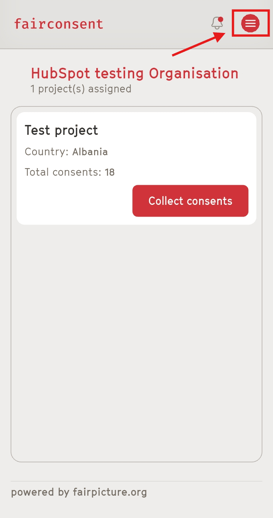
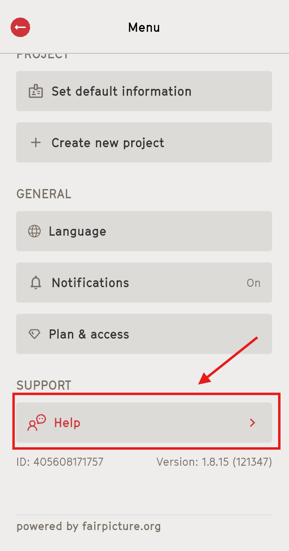
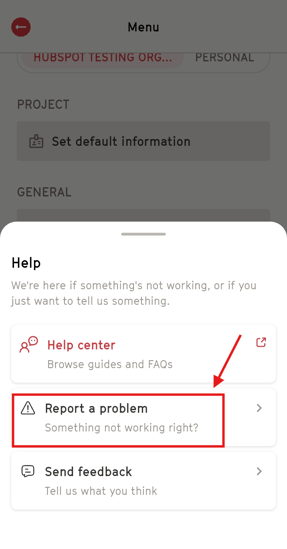
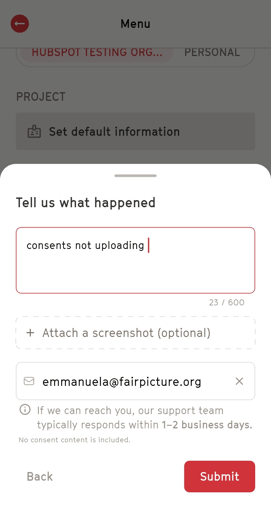
5. Optional: tap Attach a screenshot to show what you're seeing.
6. Check that your email address is correct, so our team can reply to you.
7. Tap "Submit".
8. If you're offline, you'll see a Report saved message. Tap Done. Your report will be sent automatically when your connection is back.
How to write a helpful report
The more details you share, the better we can help. Try to include:
- what you were trying to do
- what happened instead, including any error message
- when it happened
- the project you were working in
- whether you were connected to the internet
Example:
"I collected 5 consents offline in Test project. When I connected to Wi-Fi, they stayed as pending for more than and giver's hour. No error message appeared."
What's included in your report
- Your description, your screenshot (if you add one), and your email address.
- No consent content is included.the Consent giver personal information and consent details are not shared in your report.
Good to know
- Reporting offline: you can report a problem without internet. The app saves your report and sends it automatically as soon as you're connected again.
- Response time: our support team typically responds within 1–2 business days after your report is sent.