
This guide explains how to customize the labels for your consent data when it syncs to ResourceSpace. By mapping FairConsent’s default fields to your ResourceSpace Shorthand Names, you ensure that information like names, dates, and emails appears under the correct metadata headers in your DAM.
To successfully map your fields, please ensure:
- Integration is Active: Your ResourceSpace instance is already connected to FairConsent (see our Integration Guide).
- 2. Admin Permissions: You must be logged in as an Owner or Admin in FairConsent to access App Settings.
- 3. Fields Exist in RS: The metadata fields you want to sync to must already be created in your ResourceSpace instance.
Step 1 – Locate your ResourceSpace Shorthand Names
FairConsent requires the Shorthand Name of your ResourceSpace fields to successfully pass data.
- Log in to your ResourceSpace instance as an admin.
- Click the Burger Menu (≡) in the top right.
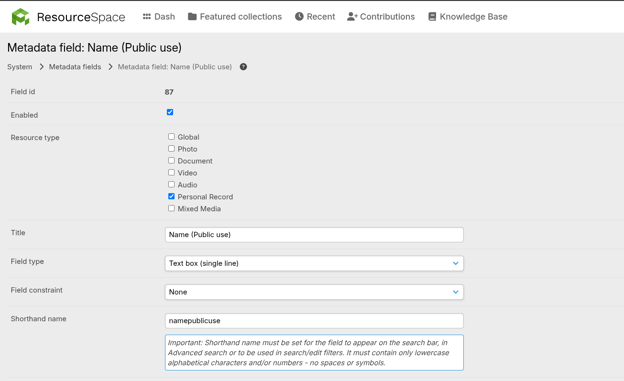
- Navigate to System → Metadata fields.
- Find the field you wish to map (e.g., "Name (Public use)").
- Locate the Shorthand name column for that field and copy the value (e.g., fullname or consentgiver).
Note: Shorthand names are usually lowercase and do not contain spaces. Always use the shorthand name, not the "Title" of the field.
Step 2 – Map Fields in FairConsent
Once you have your shorthand names, you can link them to FairConsent’s default labels.
- Log in to the FairConsent Platform.
- From the left-hand sidebar menu, click on App Settings.
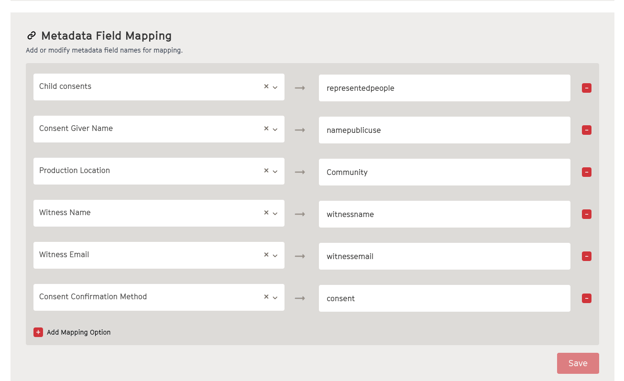
- Scroll down to the Metadata Field Mapping section.
- You will see a list of FairConsent’s default fields (e.g., "Consent Giver Name").
- In the input field next to the default label, enter the corresponding ResourceSpace Shorthand Name.
How it Works:
When a user(collector) upload a consent form to the platform, FairConsent looks at your mapping table. If you have mapped "Consent Giver Name" to publicname, FairConsent will tell ResourceSpace: "Take the value from the Name field and put it into the metadata field with the shorthand name 'publicname'."
Troubleshooting
Data is missing in RS: Double-check that the Shorthand Name in FairConsent matches ResourceSpace exactly (check for typos or extra spaces).